
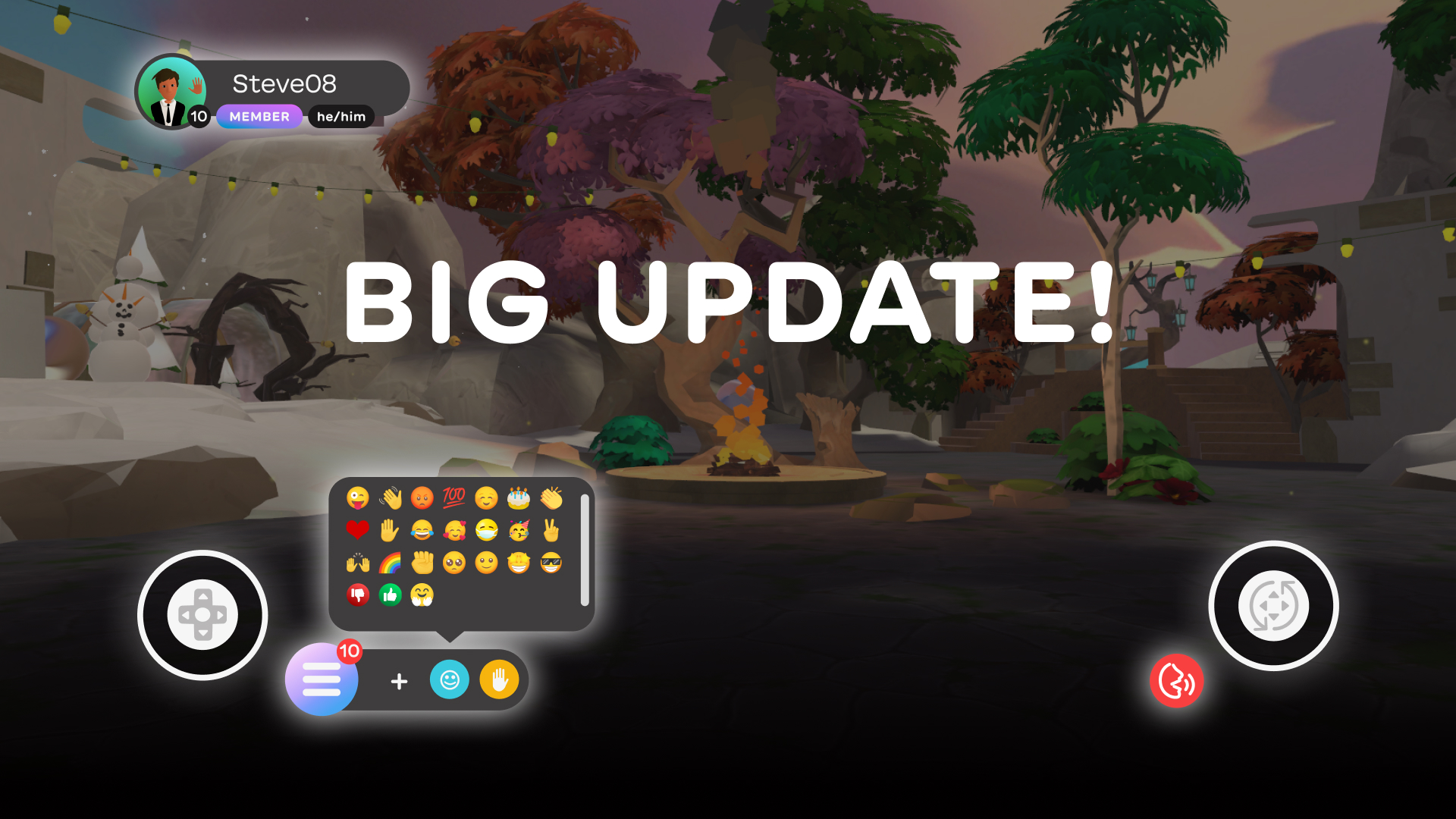
At Innerworld, we are dedicated to providing a seamless and enjoyable experience for our community members. With this in mind, we are thrilled to announce a series of UI updates designed to enhance your journey. Here’re a rundown of the major updates we’ve made and pointers for accessing key features.

Redesigned Heads-Up Display (HUD)
Until now, any action taken in Innerworld required members to open the Quick Menu and find what they were looking for. In our new Heads-Up Display, we’ve made key actions like emojis, drawing, spawning tools, and opening the journal much quicker. Users will see a short toolbar on the bottom of the screen with four buttons, as well as the push-to-talk button:
- The first button on the left opens our newly-designed Main Menu. From the Main Menu, you can access events, series, chats, your notifications, settings, and more.
- The next button is a “+” icon, which opens a small tab from which users can draw, spawn tools, spawn games, open the journal, and add text to a world.
- The third button opens an emoji menu with all emojis readily available to send. No more clicking into submenus to find the emoji you’re looking for!
- The fourth button lets you raise and lower your hand.
- The push-to-talk button is also placed in line with the tool bar on the right-hand side for mobile and tablet users. (In VR, users still press “A” to talk).
Accessing and Joining Events from the Main Menu
To access events, simply open the Main Menu using the large gradient button on the left end of the toolbar. A short list will pop open. At the top, you’ll see an option labeled “Events.” Tap it.


As pictured below, the events screen will open, and you can explore events, RSVP, and view the events you’ve RSVP’d to as you. To return to the app, just tap the “X” in the top right corner.


Accessing tools, Drawing, the Journal, etc.
Next to the Main Menu button is a “+” button. From here, you can access key actions including: drawing, adding text to a world, opening your journal, adding tools to a world, and spawning games.


Accessing and Sending Emojis
To the right of the “+” button is the emoji button. We know our members love emojis, and we’ve put them all front and center so you can find the right reaction even quicker. Tap the emoji button to see our whole menu of emojis, and tap the emoji of your choice to send it into the world.


New Nameplate with Pronouns and Badges
Identity and recognition are crucial in fostering a supportive and inclusive community. Our new nameplate feature includes space for pronouns, allowing you to express yourself authentically and to let others know how to address you correctly. Badges, once available, will also display on your nameplate! This update is a step forward in making Innerworld a more welcoming place where individual achievements are recognized by everyone.

Using Push-to-Talk
The Push-to-Talk feature remains one of Innerworld’s most important components. In our new UI, users on mobile and tablet will find it to the right of the toolbar. To talk, simply press and hold the Push-to-Talk button, just like before. We’ve also added additional indicators so you can confirm that your voice is being heard. When you press and hold the Push-to-Talk button, the button will light up red, your nameplate will light up red, and your name will appear on the left-hand side of the screen with a little red icon. When you’re finished speaking, release the Push-to-Talk button.


Consistent and Cohesive Look and Feel
One of our main goals was to create a consistent and cohesive look across all platforms—whether you’re using VR, iOS, or Android devices. The cohesive aesthetic ties together all elements of the app, providing a visually pleasing and harmonious environment. So, if you’re switching between devices (VR at home and mobile when you’re on the go) both experiences in the Innerworld app will feel aligned.
These updates are part of our ongoing commitment to improve your experience in Innerworld. We believe that these enhancements will make your journey smoother, more intuitive, and ultimately more rewarding. We can’t wait for you to explore these new features and continue your mental health journey with us.